
Log analyzer · part of EasySYS

Every log source gets a dashboard of its own.

EasyLog collects syslog from your web servers, firewalls and WAFs, parses each source by type into an embedded DuckDB store, and turns it into live dashboards you can click straight through to the raw lines. One binary, and nothing leaves your network.

Rust core Single binary Embedded DuckDB Offline geolocation
admin@web-01 — bash
# 1 — in EasyLog, register this host as an Apache source # 2 — send it a line over syslog $ logger --udp -n easylog -P 514 -t apache \ "$(tail -n1 /var/log/apache2/access.log)" # 3 — parsed, stored in DuckDB, on its dashboard → http://easylog:3000/web/apache
Ingest
syslog :514
State
one DuckDB file
Arch
x86_64 · arm64
Packaged for
Debian / Ubuntu RHEL / Fedora openSUSE / SLES Air-gapped .deb / .rpm x86_64 · arm64
Supported log types

Nine log types. A dashboard built for each.

A web log asks how fast and how often. A firewall log asks what was denied. A WAF log asks what got through anyway. Each family gets the layout that answers its own question.

/web
Web servers & proxies

Requests, latency, status codes

Requests over time, error rate and bytes served, average and p95 request duration where the proxy logs it, and the top URLs, clients and countries behind them.

ApacheNginxCaddyHAProxyTraefik
/firewall
Firewalls

What was denied, and from where

A deny rate and the allow/deny split, top sources, destinations and ports, the rule that decided, and the application wherever PAN-OS identifies one.

Cisco ASAPalo Alto PAN-OS
/waf
Web application firewall

What the policy let through

Six verdicts stacked over time, a Served anyway count for requests an enforcing policy would have refused, the split per appliance and site, and the rules that fired.

EasyWAF
/general
Everything else

Raw lines, kept and searchable

For a device EasyLog has no parser for: every line stored exactly as it arrived, with volume over time, the top senders, hostnames and tags, and full-text search.

Any syslog source
Dashboards

From a spike on the timeline to the lines that caused it.

Every panel is a filter. Click a bar, a status class, a country or a client and the whole dashboard follows, and the raw log lines behind it are one button away.
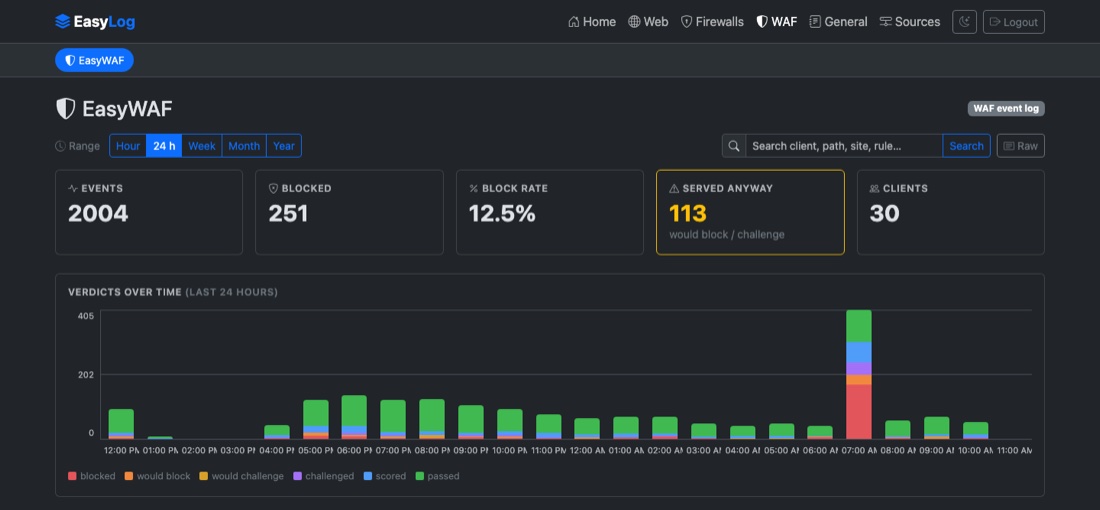
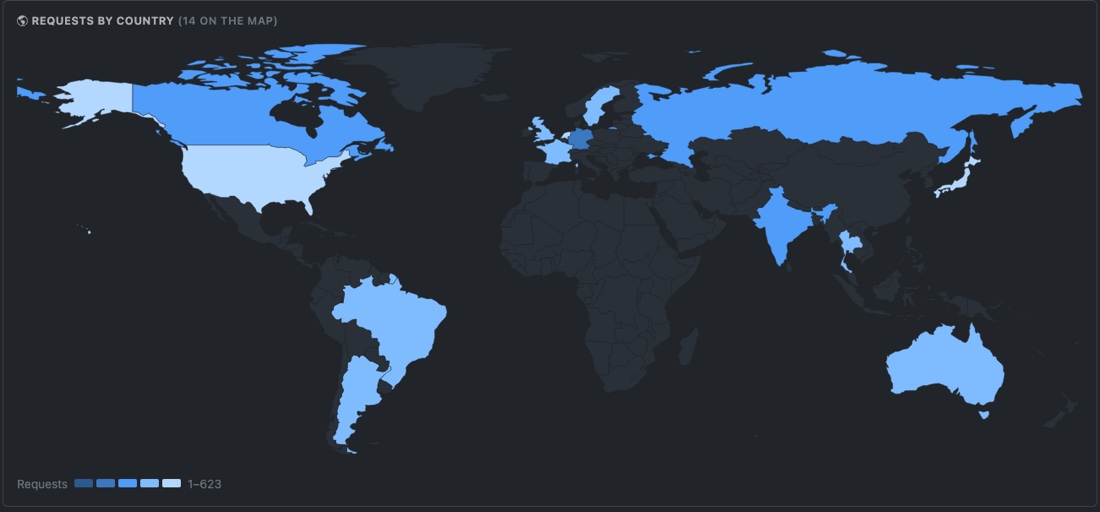
The EasyWAF dashboard: KPI cards and verdicts stacked over time
World map of requests by country

Click to filter

Every URL, client, status class, rule and country is a link. Filters stack as removable chips and live in the URL, so any view can be shared.

Zoom into a period

Click the 2am bar and the page is pinned to 02:00–03:00, re-bucketed into five-minute bars. Keep clicking and you reach a single minute.

Raw lines, one click away

The Raw button swaps the charts for the log lines behind them, under the same filters. Page through them, or download every matching line.

Search every field

One box across URLs, clients, agents, rules, ports and applications. It narrows the KPIs, the charts and the map together.

Offline world map

Client addresses are resolved to countries at ingest, from a database bundled in the binary. No lookup ever leaves the machine.

Bounded storage

Set a retention window and old events are pruned every hour. The database is compacted at startup to hand the disk back.

Architecture

One binary between your devices and your dashboards

Devices send syslog the way they already can. EasyLog routes each message by the address it came from, parses it by type, and stores it as rows in DuckDB. Every dashboard is a live query over them.

SOURCES EASYLOG YOU Web servers & proxiesNginx · Apache · Caddy FirewallsCisco ASA · PAN-OS EasyWAFevent log · logfmt EasyLogone binary · syslog :514 UDP/TCP Routeby source IP Parse9 log types DuckDBcolumnar rows SourcesIP → log type Dashboards · raw view · searchlive SQL · web UI :3000 Administratorsany browser syslog syslog logfmt queries HTTP
EasySYS service Your existing infrastructure Sources are mapped to log types in the web UI, with no config file to edit.
Deploy

Running in minutes. Upgraded like everything else.

EasyLog installs from the signed EasySYS package repository, starts on boot under systemd, and upgrades through the package manager you already use. The installation guide has the details.

1
Add the signed repository
Signed apt, yum and zypper channels, for x86_64 and arm64.
2
Install and enable the service
It starts on boot and listens for syslog on port 514.
3
Create your admin, add a source
Open the web UI on port 3000 and map a sending host to its log type.
# 1 — trust the repository $ curl -fsSL https://repo.easysys.io/easylog/stable/debian/key.gpg \ | sudo gpg --dearmor -o /usr/share/keyrings/easysys.gpg $ echo "deb [signed-by=/usr/share/keyrings/easysys.gpg] \ https://repo.easysys.io/easylog/stable/debian ./" \ | sudo tee /etc/apt/sources.list.d/easylog.list # 2 — install and start $ sudo apt update && sudo apt install easylog $ sudo systemctl enable --now easylog # 3 — create your admin → http://<host>:3000/
# 1 — trust the repository $ sudo tee /etc/yum.repos.d/easylog.repo >/dev/null <<'EOF' [easylog] name=EasyLog baseurl=https://repo.easysys.io/easylog/stable/redhat enabled=1 gpgcheck=1 gpgkey=https://repo.easysys.io/easylog/stable/redhat/key.gpg EOF # 2 — install and start $ sudo dnf install easylog $ sudo systemctl enable --now easylog # 3 — create your admin → http://<host>:3000/
# 1 — trust the repository $ sudo zypper addrepo -fg \ https://repo.easysys.io/easylog/stable/redhat easylog # 2 — install and start $ sudo zypper install easylog $ sudo systemctl enable --now easylog # 3 — create your admin → http://<host>:3000/
# 1 — download the package for your architecture # github.com/easysysio/EasyLog/releases # 2 — install and start $ sudo dpkg -i easylog_*_amd64.deb # or _arm64.deb $ sudo rpm -i easylog-*.x86_64.rpm # or .aarch64.rpm $ sudo systemctl enable --now easylog # 3 — create your admin → http://<host>:3000/

Start with one source.

Point a single web server or firewall at EasyLog and watch its dashboard fill up. MIT licensed and developed in the open.